Words in Color
- 4.4
- Rating
- 50.00K
- Installs
- Free
- Price
 Analysis by App-foxy
I approached Words in Color as a small, focused word game rather than something designed to occupy an entire evening. Its basic idea is easy to understand: connect letters, discover words, and keep working through the available puzzles. That simplicity is the main reason I found it approachable. I could open it for a short break, make a few attempts, and put it down without needing to remember a complicated story or a large set of rules.
It comes from Second Gear Games and sits firmly in the word-game corner of mobile gaming. The store summary describes the central action in a few words, but the practical appeal is in how little preparation it demands. There is no long tutorial to study before playing. You can start by looking at the letters, testing possible combinations, and learning the rhythm of the puzzles as you go.
The game is free to download, with optional in-app purchases ranging from $2.99 to $29.99 per item. That makes it easy to try without committing money first, although players who dislike any purchase prompts or prefer a completely unrestricted experience should keep that model in mind. It is rated for Everyone, and its minimum operating system requirement is Android 4.0.3, so it is aimed at a broad range of devices rather than only recent phones.
You May Also Like

 Blood Strike: 2.5 Anniversary
Blood Strike’s Loadouts Turn Every Drop Into a Tactical Gamble
A close look at Blood Strike’s custom loadouts: how fast access to signature weapons reshapes its battle royale rhythm, rewards preparation, and narrows the gap between fights.

 Pandora - Music & Podcasts
Pandora’s Music Is Easy to Start, but Harder to Recover
Pandora’s strength is its low-effort path from a seed to a station. Its weak spot is how much confidence it asks you to place in connection, setup, and quiet recovery.

 8 Ball Pool
 Is Built on Rivalries, Rematches, and Routine
A close look at the rivalries, rematches, shared routines, and unanswered safety questions that turn a quick pool match into a persistent mobile community.

 Samsung Music
’s Quiet Strength Is Playing What You Already Own
Its reach comes less from spectacle than from dependable access to a personal library. That simplicity is both the app’s strongest retention engine and its ceiling.

 AccuWeather: Weather Radar
AccuWeather Review: A Quick, Clear Forecast for Everyday Decisions
For everyday plans, the best forecast is the one you can understand quickly. AccuWeather makes rain timing, radar, and local conditions easy to act on, with a few trade-offs.

 Hill Climb Racing
Why Hill Climb Racing Still Turns Crashes Into One More Run
A tiny car, a bumpy hill and one more upgrade: Hill Climb Racing keeps resurfacing because its simple chaos makes every near-miss feel personal.
More From Our News Desk
View All News


How the basic puzzle loop feels in everyday use
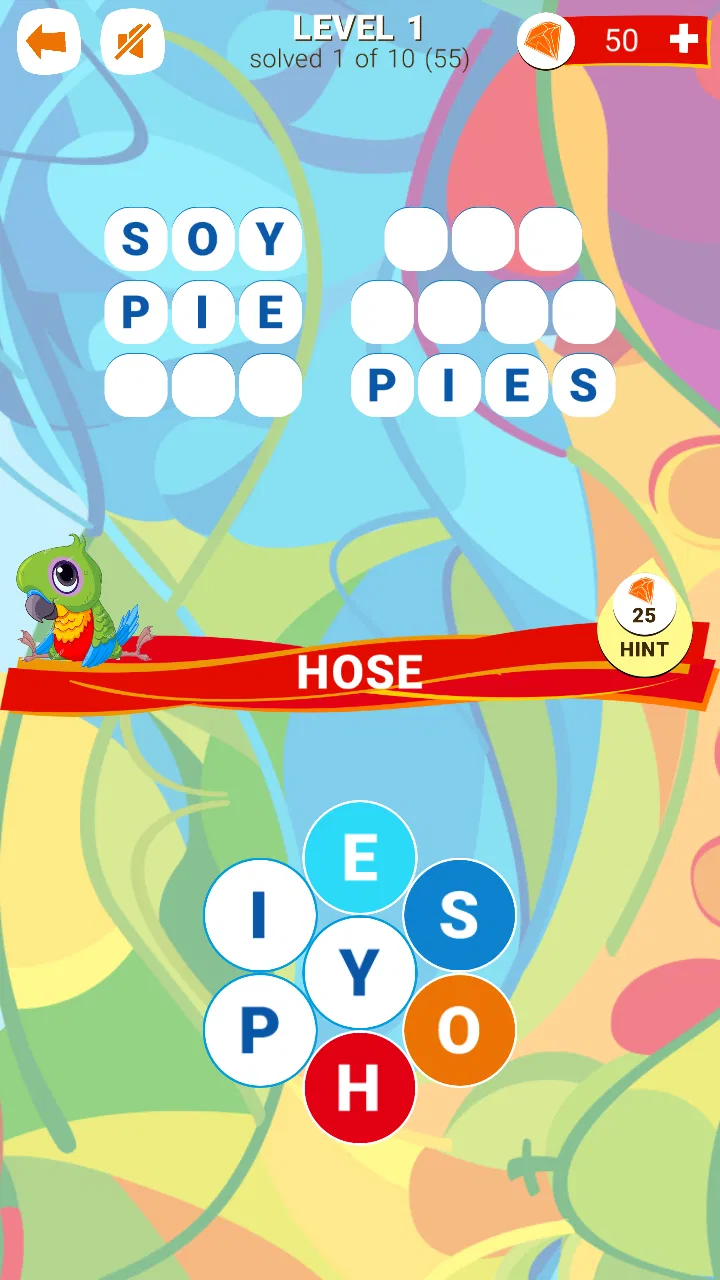
The most natural way to play is to treat each puzzle as a short exercise in observation. I first scan the available letters without immediately dragging across every possible combination. That quick pause matters because the obvious short word is not always the most useful starting point. Once I spot a familiar pattern, I connect it and use the result to narrow down what might fit next.
This creates a pleasant middle ground between guessing and deduction. The game is not asking me to write a full list of words on paper, but it also does not reduce the experience to tapping random letters. I have to notice common beginnings, endings, and letter groupings. When I get stuck, changing my perspective is usually more productive than repeating the same swipe in a slightly different direction.
A realistic use case is a short wait at a bus stop or a few quiet minutes after lunch. I can play without sound, stop after one small stretch of progress, and return later to the same kind of mental task. That makes it more convenient than a word game that requires a long timed round. It also suits someone who wants a calm distraction rather than a competitive match.
The interface concept is especially friendly to people who already enjoy word searches, anagrams, or crossword-style clues but do not always have the patience for a full newspaper puzzle. The connection mechanic gives the hands something simple to do while the brain works through vocabulary. I found that the physical gesture can make the search feel more active than merely selecting answers from a list.
At the same time, this is not the right choice for every word-game player. If you want a rich narrative, head-to-head competition, daily social challenges, or a large strategic layer, this experience may feel too narrow. Its value comes from repeating a compact word-finding activity, not from constantly introducing new genres of play.
Building a repeatable solving habit
Experienced players can make the opening seconds of each puzzle more useful by following the same routine. I begin with the longest-looking word patterns, then check for familiar suffixes such as common plural or verb endings. After that, I try shorter words that may reveal how the remaining letters are intended to work together. This is more efficient than swiping in every direction without a plan.
Another helpful habit is to separate recognition from confirmation. When a word comes to mind, I do not immediately assume it is the answer. I look at the available letters again and check whether the order and connection path make sense. This small pause reduces wasted attempts and prevents one attractive guess from distracting me from a better possibility.
I also recommend mentally grouping letters by sound rather than only by visual position. A pair that commonly appears together can be easier to notice when spoken silently. This is particularly useful when the board contains several plausible short words and the missing answer seems to require a less obvious arrangement.
One non-obvious trade-off is that speed is not always the same as progress. Rushing through easy words can leave the remaining letters looking less familiar, while taking a moment to identify a central pattern often opens several possibilities. The game rewards a steady scan more than frantic movement, so players who normally rely on rapid guessing may improve simply by slowing down at the right moment.
Settings and device habits worth checking
Because this is a lightweight word game, I would check the practical settings before settling into a long session. The first thing I consider is whether sound or other feedback is comfortable in the place where I am playing. A quiet puzzle is useful in a waiting room or shared office, while stronger feedback may make casual play feel more responsive at home.
Screen orientation and touch comfort also deserve attention. On a smaller phone, a connection gesture can feel less forgiving than on a larger display, especially when letters sit close together. Holding the device in the position that gives my thumb the clearest path makes a bigger difference than trying to play faster. If a swipe feels uncertain, I adjust my grip before blaming the puzzle.
I would also keep the purchase model in mind before handing the game to a child. The Everyone age rating makes the content broadly accessible, but free games with optional purchases still deserve the same basic device-level purchase precautions as other mobile titles. That is not a criticism of the word mechanic; it is simply a sensible part of managing a game on a shared phone.
The current version is 1.0.4, and the game has been available since Jul 4, 2020. Those details place it among established, straightforward mobile titles rather than a brand-new release that is still defining its identity. I would install it on an older compatible device without expecting a demanding visual workload, but I would still keep the operating system requirement in mind when using very old hardware.
One useful routine is to decide in advance whether a session is for relaxed play or focused solving. During relaxed play, I accept that I may leave a puzzle unfinished and return later. During focused play, I avoid switching between several apps because the word patterns are easier to hold in mind when I stay with one board. That simple distinction helps prevent the game from feeling either aimless or unnecessarily demanding.
Finding faster patterns without turning it into a chore
The quickest improvement comes from recognizing how English words are built. I look for common endings, repeated consonant combinations, and short connecting sounds before testing unusual vocabulary. A word that seems too ordinary to matter can still be valuable because it confirms part of the letter structure and makes the remaining search smaller.
I have also found it useful to work from both directions. Instead of always starting at the first visible letter, I try a likely ending and mentally build backward. This is particularly effective when the beginning of a word could support several options. Switching direction breaks the habit of seeing the board as a fixed left-to-right sentence.
Another practical technique is to keep a small mental inventory of words that have already failed. I do not need to remember every attempt forever, but I avoid immediately repeating a combination that produced nothing. That sounds obvious, yet repeated guesses are one of the easiest ways to make a compact puzzle feel more frustrating than it really is.
Players who use hints or other assistance should treat them as learning tools rather than automatic solutions. When I need help, I first identify what kind of blockage I have: missing vocabulary, uncertainty about the connection, or simply a failure to notice a familiar pattern. Knowing the problem makes the assistance more valuable because I can apply the lesson to later puzzles instead of spending help without understanding why I was stuck.
This is where the game differs from a crossword app. A crossword usually gives a clue that guides meaning, while this style of play makes the letter arrangement itself the main evidence. It also differs from a timed anagram game because the pressure is less about producing as many answers as possible before a clock ends. Compared with those alternatives, Words in Color is better for players who enjoy visual searching and incremental discovery, but less satisfying for people who want rich clues, rankings, or constant urgency.
It is also worth remembering that vocabulary strength can affect the experience. Someone who reads widely may recognize unusual combinations quickly, while a younger player or a learner of English may need more time. The Everyone rating makes the game broadly suitable, but “suitable for everyone” does not mean every puzzle will feel equally easy for every player. The challenge depends heavily on the player’s language familiarity.
Where the simple design reaches its limits
The same focus that makes the game accessible can eventually make it feel repetitive. Once I understand the basic solving rhythm, the main activity remains the same: inspect letters, connect a possible word, and continue searching. That can be relaxing, but players who need new mechanics to stay interested may start looking elsewhere after the novelty fades.
There is also a limit to how much strategy can be built around a puzzle format centered on word discovery. I can improve my scanning habits and become more selective with guesses, but I am not managing resources, developing a character, or making decisions that change a wider game world. The depth is linguistic and observational rather than strategic in the traditional gaming sense.
Occasional friction is likely when a word feels obvious to the player but the intended connection is not. In a game based on dragging across letters, the difference between a successful path and an awkward gesture can affect the mood of a session. On a compact screen, thumb placement and the spacing of letters matter. I found that playing carefully is more reliable than assuming every fast swipe will register exactly as intended.
The free-to-play structure is another consideration. The initial price is free, which is helpful for trying the core experience, but optional items priced from $2.99 to $29.99 can make the overall cost less predictable for players who rely heavily on extras. I would recommend deciding beforehand whether I am comfortable playing within the free experience or spending occasionally, rather than making purchase decisions while frustrated by a difficult puzzle.
For someone who wants a completely offline-feeling, distraction-free word tool, a traditional book of puzzles may still be better. A paper crossword has no touch-registration issue and no purchase model after buying the book. For someone who wants an endlessly changing competitive environment, a multiplayer word title would be a stronger choice. This game makes more sense for the person who values convenience, short sessions, and a direct connection between seeing letters and finding words.
The audience response suggests that the approach works for many players: the game holds a 4.4 average from around 389 ratings, with over 50K installs. I read those figures as evidence of a healthy level of interest, not as a guarantee that every player will enjoy the same pace. A word-game rating can hide very different expectations, so I would use the numbers as reassurance about general appeal while still matching the game to my own preferred style.
Who should install it and who should skip it
I would recommend it to casual players who like vocabulary puzzles but do not want a complicated interface. It is a good fit for short breaks, quiet evenings, and anyone who enjoys solving by spotting patterns rather than reading elaborate clues. It can also work for families sharing a device, provided the adult managing the phone is comfortable with the free-to-play purchase setup.
It is less suitable for players who need a strong reason to return every day beyond the puzzles themselves. If your ideal word game includes social competition, detailed progress tracking, themed events, or a story campaign, this compact format may not offer enough variety. Likewise, players who dislike dragging gestures or who find repeated letter searches tiring should probably choose a different kind of word challenge.
For language learners, I see both an advantage and a limitation. The game encourages attention to spelling, endings, and common letter groups, which can support vocabulary awareness. However, it may not explain why an answer is correct or teach definitions in a structured way. I would use it as a light practice companion, not as a replacement for a dictionary, lesson, or guided language app.
My strongest practical recommendation is to give it a short trial under the conditions in which you actually plan to play. Try it silently on your usual phone, use a careful scanning routine, and notice whether the repeated connection mechanic feels satisfying after the first few puzzles. That test tells you more than a generic promise of easy wordplay because the gesture and pacing are central to the experience.
Second Gear Games has kept the concept clear: the game does not need a large explanation to become playable. That clarity is a strength when I want something immediate, but it also means the title has fewer layers to uncover. I appreciate that honesty in the design. It is a focused word pastime, not a broad all-purpose game collection.
My verdict after settling into the routine
After playing with a consistent approach, I came away seeing Words in Color as a dependable small puzzle rather than a title that tries to do everything. Its best quality is the low barrier between opening the app and beginning to solve. The letter-connection mechanic gives ordinary vocabulary a tactile shape, and the short-session format makes it easy to fit around daily routines.
I especially like it for moments when I want mild concentration without pressure. The game gives me something concrete to inspect, yet it does not demand the commitment of a long campaign. The most satisfying sessions are the ones where I stop guessing, recognize a useful pattern, and let one discovery guide the next. That feeling is modest, but it is exactly what this kind of game should provide.
My reservations are equally clear. Repetition can become noticeable, touch accuracy may matter on smaller screens, and the optional purchase structure will not appeal to everyone. Players looking for clues, competition, narrative, or deep progression should choose a more specialized alternative. The game is strongest when judged as a focused letter puzzle, not when measured against every type of word entertainment.
My final recommendation is simple: install it if you want calm, accessible word sessions built around visual letter patterns, and skip it if you need variety beyond that core loop. With its free entry point, Everyone rating, broad device compatibility, and straightforward design, it is easy to test. Just approach it with realistic expectations, develop a repeatable scanning habit, and decide early whether the puzzle rhythm itself is enough to keep you coming back.
For me, that focused rhythm is worthwhile in the right setting. I would keep it available for short waits and relaxed breaks, while turning to crossword apps for clue-based solving or competitive word games for social energy. Within its own lane, Words in Color is a pleasant, uncomplicated choice that rewards patience, pattern recognition, and a willingness to look at familiar letters from a different angle.
FAQs for Words in Color
01What is Words in Color?
Words in Color is a word puzzle game that combines vocabulary challenges with a colorful visual design. Players solve word-based levels by identifying, arranging, or connecting letters according to the instructions shown on screen. The game is designed for short sessions, making it suitable for casual play, while progressively harder puzzles provide a greater challenge for users who enjoy testing their spelling, logic, and vocabulary skills.
02How do you play Words in Color?
Gameplay is based on solving word puzzles presented with different colors and letter combinations. Depending on the level, you may need to find hidden words, connect letters, complete a phrase, or recognize the correct relationship between colors and words. The controls are generally simple and touch-focused, so new players can begin quickly. Later stages require more concentration, pattern recognition, and a broader vocabulary.
03Is Words in Color free to download and play?
Words in Color can generally be downloaded without an upfront purchase, allowing users to try the main gameplay at no initial cost. However, availability of advertisements, optional hints, extra lives, or other in-app purchases may depend on the version and platform. Before downloading, it is worth checking the store listing for current pricing, subscription details, advertising information, and any purchase requirements.
04Does Words in Color work without an internet connection?
Some parts of Words in Color may be playable offline, particularly previously loaded puzzle content and the core single-player experience. Nevertheless, an internet connection may be needed for downloading new levels, displaying advertisements, restoring purchases, synchronizing progress, or accessing online features. If offline play is important to you, test the game after disabling mobile data and Wi-Fi, because functionality can vary between updates and devices.
05Is Words in Color suitable for children and all age groups?
Words in Color is generally approachable for casual players because its controls are simple and the main focus is on language and visual puzzle solving. Its suitability for children depends on the difficulty of the vocabulary, advertising content, privacy settings, and any available in-app purchases. Parents should review the official age rating and store information, and consider enabling device-level purchase restrictions before allowing younger users to play.
Pros
- Simple color-based gameplay is easy to understand from the first round.
- Short challenges make it suitable for quick breaks or casual play.
- Minimalist visuals keep the board clear and easy to read.
- Improves attention by requiring players to compare colors and words.
- Works well for players who enjoy relaxed puzzle experiences.
Cons
- Some levels may feel repetitive after extended play sessions.
- Color perception difficulties can make certain challenges frustrating.
- Progression may seem slow for players seeking more variety.
- Small visual differences can be difficult to distinguish on phones.
- The game may offer limited appeal to players who prefer action or story.

Words in Color
Gallery